Your watch counted the run. Your food app did not care. The scale went up on Tuesday and you assumed you failed.
That is the quiet failure mode of tracking. Not laziness. Two apps that never share a day.
Dietrack connects to Apple Health (iPhone) or Health Connect (Android) so Progress can relate nutrition, movement, energy, and weight response in plain language.
The product hub is the calorie tracker for meals you actually cook. How the optional Health connection works, including what Dietrack does not change, is on calorie tracker with Apple Health and Health Connect. Health and Health Connect are how Progress talks to that log, not a second calorie homepage.
For the Today / Ideas / Kitchen redesign, see Eat better with less effort: inside Dietrack’s redesign.
Why separate apps make the scale feel broken
Steps live in one place. Calories live in another. Weight lives in a third. You do the math in your head at night and get it wrong.
So Tuesday looks like a failure when it was mostly water, salt, or timing. You change nothing useful. Or you change everything and burn out.
You do not need another fitness dashboard. You need the same week to include what you ate, how you moved, and what the scale is doing over time.
Where you connect
- iPhone: Apple Health
- Android: Health Connect
Path: Profile → Wearable connections.
You choose to connect. There is a clear disclosure before you do. You can disconnect anytime (that stops future reads on that device). Past synced data stays until you delete the account. Delete account removes stored activity, workouts, weight, and food-completeness records. Export requests go to support@dietrack.app.
What Dietrack reads
Dietrack reads:
- Steps
- Active calories (a device estimate of movement energy)
- Workouts / exercise sessions
- Weight
If your watch already writes those into Apple Health or Health Connect, they can flow through. Dietrack does not try to be your training coach, and it does not treat active calories as “extra food you earned.”
Sync happens when you connect, when you open or resume the app (if still connected), and when you tap Sync.
Today stays light
Today answers: what is happening today, and what should I do next?
When Health is connected, Today and your day detail can show steps, active energy, and workouts next to your meal budget. Same day. Less guessing. No long charts on Today.
Wearables are a means. The point is progress you can understand.
Progress: what is happening, why, and how sure
Progress answers: is what I am doing working?
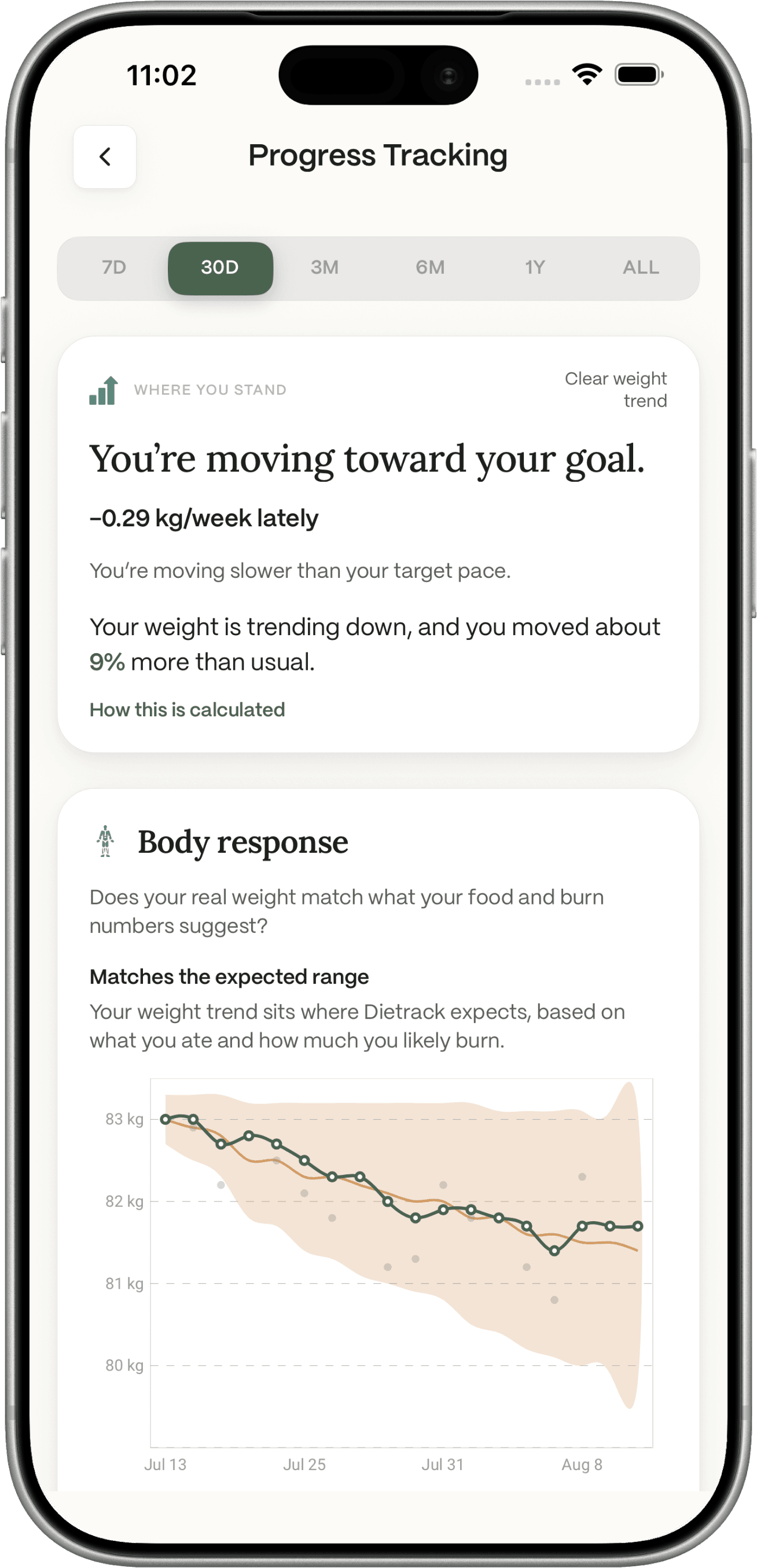
It follows a clear order: status → why → evidence.
First the conclusion, for example:
- Moving toward your goal
- Your trend has been stable
- Still learning
Not a wall of steps, workouts, and calories with no meaning.
Then a short why. Dietrack uses your own patterns when it can, like movement compared with your usual week, not a generic 10,000-step rule.
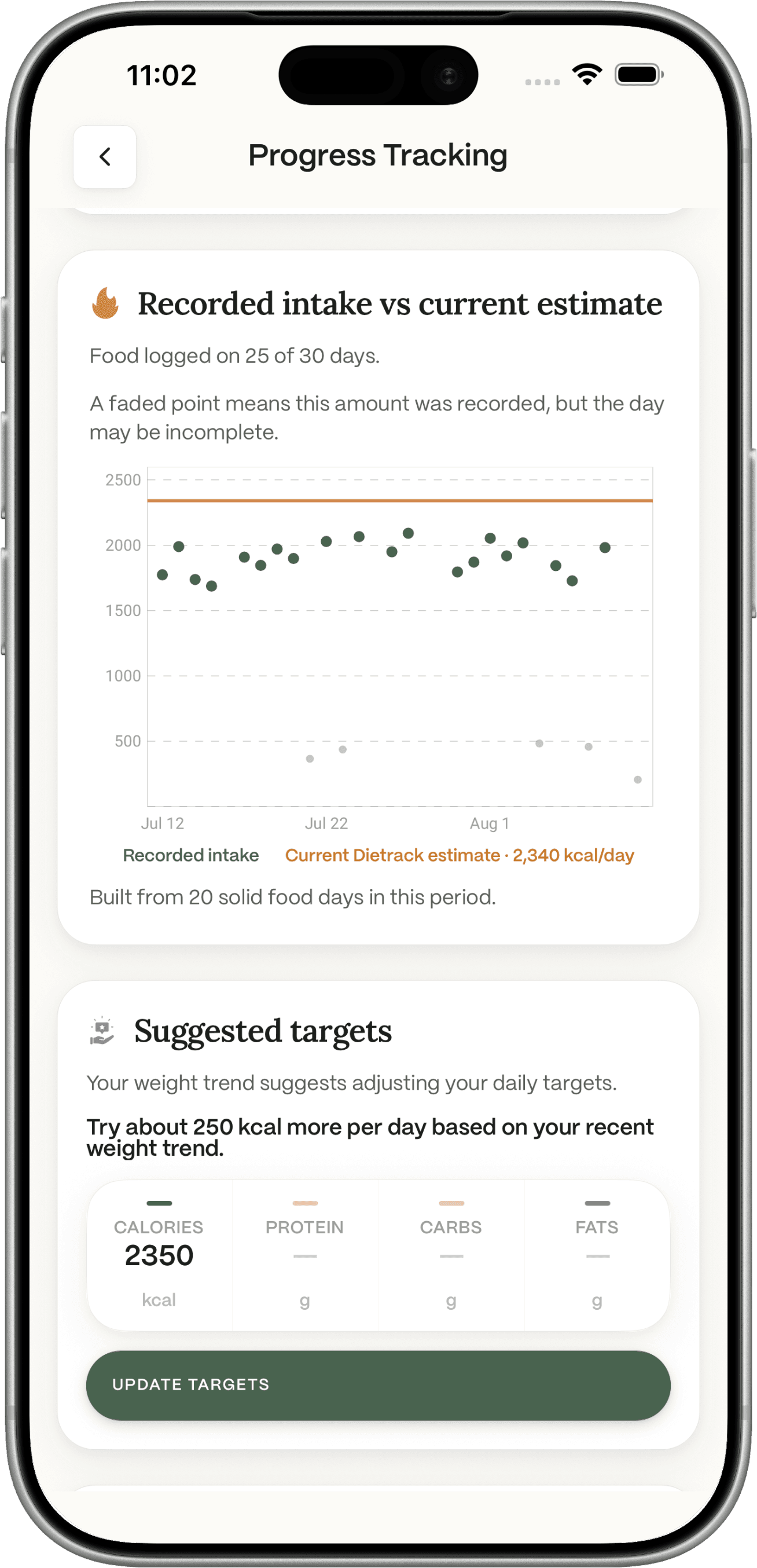
Then the evidence: weight trend, average intake, estimated burn, activity, recent workouts.
You should not need fitness jargon to read any of that.
Body response and the noisy scale
One weigh-in is weather. A smoothed trend is climate.
Food and movement help explain climate. Guilt does a poor job of explaining weather.
Body response asks whether your real weight trend sits near what food and estimated burn suggest. You might see a match, a difference, or still learning. That honesty matters more than fake precision.
If the trend suggests a change, Dietrack may suggest reviewing your targets. You decide. It does not rewrite your goals in the background, and it does not let one workout quietly rewrite your calorie target.
When data is thin, Progress says so. No fake percentages. No false certainty.
For tracker accuracy in general, see how accurate calorie trackers really are.
Clear labels matter
A few distinctions stay clear on purpose:
- Food logged is what you recorded.
- Active energy is a device estimate from Health.
- Dietrack’s burn estimate is Dietrack’s own estimate of how much you use.
- Weight trend is smoothed, not one emotional weigh-in.
- “Moving toward your goal” is an interpretation based on that picture.
Energy insights are advisory. Estimates get clearer as your food logs, weigh-ins, and activity picture get clearer.
Try one small step
When you are ready: Profile → Wearable connections. Link Apple Health or Health Connect. Open Today. Then give Progress a few days of food logs and weigh-ins.
For kitchen, Ideas, logging, and Nia, read the redesign article.
FAQ
Does Dietrack work on iPhone and Android?
Yes. Health uses Apple Health on iPhone and Health Connect on Android.
What health data does Dietrack read?
Steps, active calories, workouts, and weight.
Does it work with Apple Watch or Fitbit?
It connects to Apple Health and Health Connect. If your watch already writes steps, workouts, or weight there, that data can come through. There are no separate brand pairings inside Dietrack.
Will it change my calorie target by itself?
No. It may suggest a review. You stay in control. Active calories are not treated as “calories you earned to eat.”
Where do I connect Health?
Profile → Wearable connections.