Most of us do not fail because we do not care.
We fail because the week looks like this: good intentions in the morning, a fridge full of “I’ll use that,” a food log that feels like homework, and a scale that ruins Tuesday for no good reason. So you quit the app. You order takeout. The spinach wilts. You promise next Monday will be different.
Dietrack’s redesign starts from a different bet. You do not need a new personality. You need a clearer day, built around what is already in your kitchen and your goals. This is a changelog for people who already use Dietrack, not a leftover-chicken article. Background: about Dietrack.
Eat better, with less effort. That is the line. This article is what that looks like in the app.
What Dietrack is (in one breath)
Dietrack helps you eat better with less effort.
It builds a daily calorie target around you, turns what is already in your kitchen into meals that fit that target, and helps you log food in seconds: photo, search, browse, typing, or telling Nia.
Home is not a vague dashboard anymore. It is Today: your nutrition budget, your meals, your next useful move.
The meals tab is not a random recipe dump. It is Ideas: suggestions shaped by your inventory, preferences, and what is about to expire.
Kitchen stays the source of truth at home. Stocked kitchen, smarter suggestions. Empty kitchen, the app is honest that it needs something to cook with.
Progress tries to answer questions you actually have: what is happening, why it might be happening, and whether Dietrack is still learning. Wearables feed that story when you connect Health (short section below).
The thinking behind the redesign
Kitchen first, not guilt first. After you set up your plan, Dietrack steers you toward a simple loop: know what is in the fridge → get ideas that use it → log what you ate → see the day add up. If the first thing an app asks is “track forever,” most people leave. If the first win is “I used what I already bought,” people stay.
Food waste is a nutrition strategy. Throwing food away is money, friction, and decision fatigue. Ideas think in practical stages: check the kitchen, balance the day, reduce waste, respect allergies and preferences. Match labels feel useful, not preachy: cook now, almost there, shopping needed.
Honest over impressive. Energy insights are advisory. Dietrack may suggest reviewing targets. It does not silently rewrite your calorie goals. Progress can say still learning. Fake certainty is how apps lose trust.
Today: your day, not a dashboard
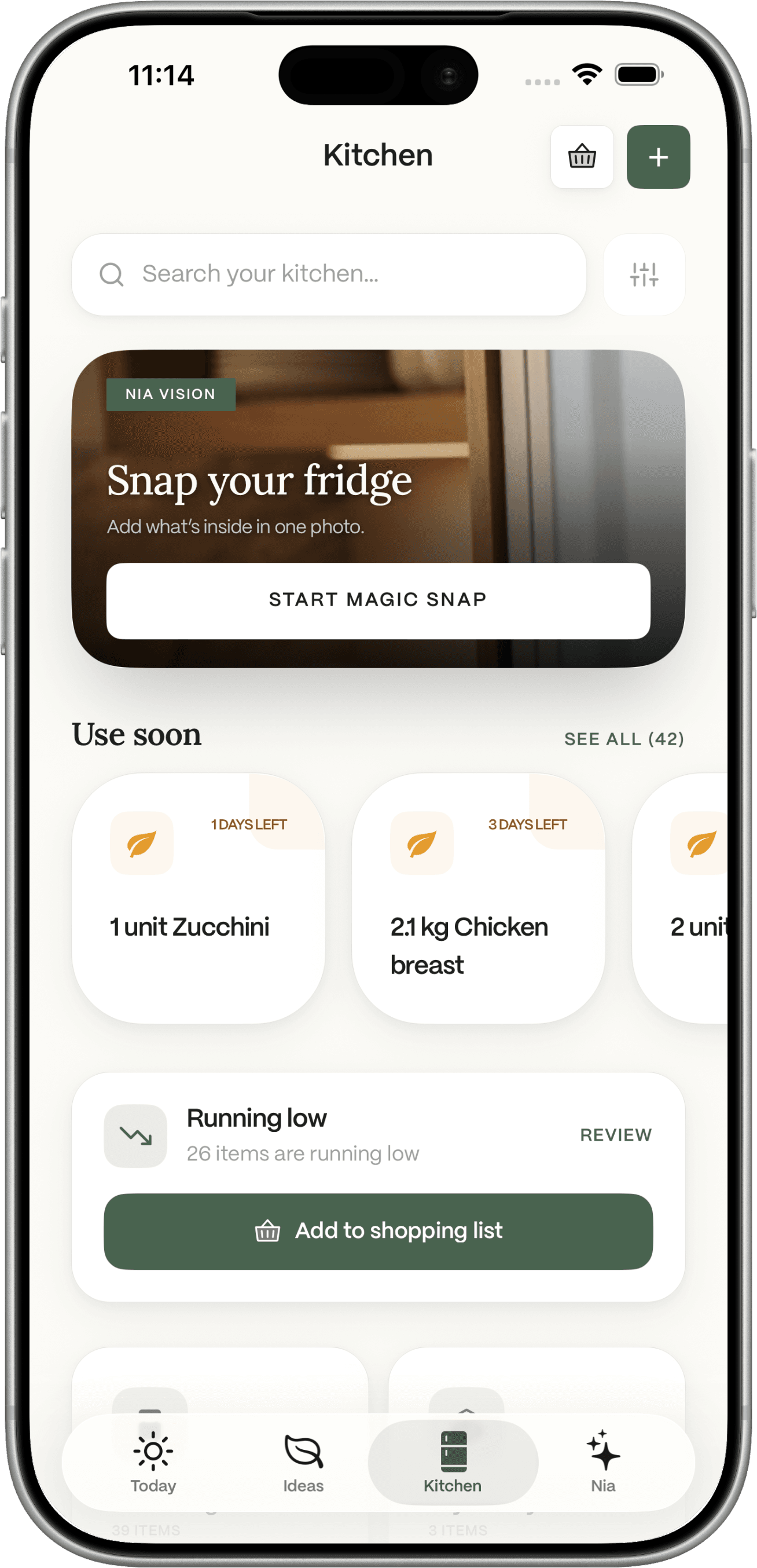
Today shows your calorie and macro budget in plain language (kcal left or over), meal slots for the day, and a best next meal from your kitchen when it can. Shortcuts match real life: snap fridge, scan food, tell Nia, shopping. Hydration and inventory status stay part of the day. When Health is connected, activity can sit next to the meal story.
Ideas: meals that fit your life
Ideas come from what you have, and prefer what is expiring soon. Meal preferences cover daily targets, diet style, allergies, and cuisines. If nothing hits the craving, Ask Nia: use what I have, high-protein, quick dinner, use expiring items.
This is also where waste reduction shows up as a real step, not a lecture. More on the meal planner from ingredients approach, and household food waste fixes outside the app.
Kitchen: stocked equals smart
The line is simple: stocked kitchen = smart suggestions.
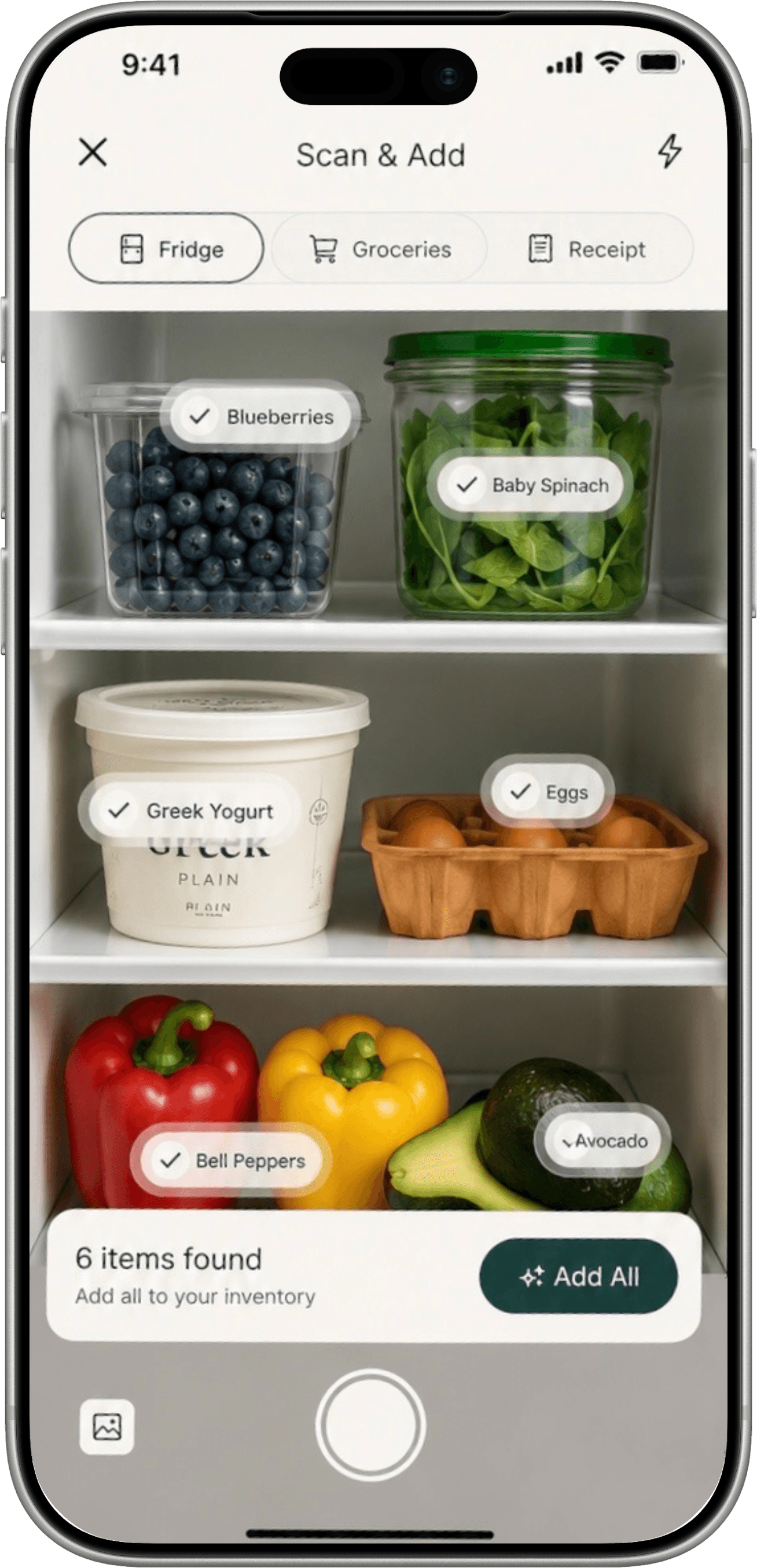
You can snap the fridge (Nia Vision), snap a receipt, use a barcode, or add by hand. “Use soon” surfaces what should leave the fridge next. Shopping plans fill real gaps. Purchased items can go back into the kitchen.
Logging can update inventory. Deleting a log can reverse those changes, so the fridge does not lie to you later.
Logging that does not feel like punishment
You can log the way your brain works that day:
- Nia Vision: photo of the plate
- Search: kitchen, recent, favorites, or type (barcode too)
- Browse: suggested meals
- Manual: build the record yourself
- Tell Nia: say what you ate
Custom meals let you search foods (USDA-backed food search) or enter numbers when you already know them. You can swipe or delete logs where you need to.
Photo meal logging, fridge and receipt snaps, advanced planning, and deeper analytics sit with Dietrack Pro. The free plan still covers the basic loop. Nutrition numbers stay estimates.
Meet Nia (without the sci-fi)
Nia is Dietrack’s in-app assistant, the Chat tab. She helps when the Ideas cards are not what you are craving, when you want to say what you ate instead of hunting a database, when you want a meal that uses what is expiring, or when you want a deeper read on a day.
Nia reduces friction. She does not replace your judgment.
Wearable connections (brief)
Wearables are not the whole product. They stop Progress from ignoring half your life.
- iPhone: Apple Health
- Android: Health Connect
- Path: Profile → Wearable connections
- Reads: steps, active calories, workouts, weight
When connected, Today can show activity next to your meal budget. Progress can relate food, movement, and weight, including honest “still learning” states. Dietrack may suggest reviewing targets. It does not change your goals by itself, and active calories are not “extra food you earned.”
Full detail on Progress, body response, and privacy: Why your calorie tracker should talk to Apple Health and Health Connect.
Welcome and setup that respect your time
Welcome leads with the brand: eat better, with less effort. Setup is a short calibration. Then Dietrack builds the day around what you already have, not a long interrogation. Profile and Settings are clearer. Progress is rebuilt around understanding.
A day with Dietrack
Morning. Open Today. See calories left, not a lecture.
Before work. Snap the fridge once this week. Kitchen is current. Ideas get smarter.
Lunch. Log with a photo, search something from your kitchen, or tell Nia.
Evening. Ideas suggests dinner that uses what you have. Shopping only fills real gaps. You cook. You log. Inventory updates.
Later in the week. Open Progress. Weight makes more sense when food (and movement, if Health is connected) share one story.
That is the feeling we want: relief. Not another system to perform for.
Who this is for
- People tracking nutrition who are tired of apps that ignore the fridge
- Anyone who hates food waste and still wants goals that fit real life
- Busy people who need logging to be fast (photo, chat, or search)
- Households that need a living kitchen list, not a forgotten notes app
- Fitness-minded people who also want Health in Progress (see the Health article)
Available with a free basic plan and Dietrack Pro for premium capabilities described in-app (advanced planning, deeper nutrition views, photo logging, fridge and receipt snap for inventory, automatic inventory updates when you log or cook). The app is in English and French.
What we are not claiming
- Not a medical device. Not a diagnosis. Not guaranteed weight loss.
- Not perfect AI. Photo and estimates can be wrong. You can edit and stay in control.
- Not “track forever or else.” Start with one fridge snap or one meal log.
Boring honesty converts better than shiny lies.
Start smaller than you think
You do not need a perfect Monday. Pick one:
- Snap your fridge so Ideas has something real to work with
- Log one meal (photo, search, or tell Nia)
- Or connect Health when you are ready (Profile → Wearable connections)
Eat better, with less effort.
FAQ
Is Dietrack only a calorie counter?
No. It is nutrition tracking plus a live kitchen, meal ideas from what you have, Nia, and Progress. Health details are in the Apple Health / Health Connect article.
Does it help with food waste?
Yes. Ideas prioritize what you have and what is expiring. Shopping fills gaps. Inventory can update when you log or cook.
Do I need Premium on day one?
There is a free basic plan. Premium unlocks more advanced capabilities described in the app.
Where do I connect Health?
Profile → Wearable connections. Short overview above; full guide in the Apple Health / Health Connect article.
Where do I start?
Snap the fridge, log one meal, or connect Health when you are ready.