You don't need to catalogue every lettuce leaf to keep track of what's in your fridge. Start with the foods you're likely to forget, note what should be used first, and choose a tracking method you'll still use next week.
This is a practical system you can run with a sticky note, spreadsheet or fridge inventory app. Dietrack is one option, but the habits work without it.
The five-minute fridge inventory
Start by opening your fridge, not an app.
- Pull forward the food you might forget. Look behind jars and under newer groceries.
- Write down only the useful basics. A food name, rough amount, storage location and a date if you have reliable date information.
- Separate items that need attention. A dedicated front shelf can help you remember safe, usable perishables before they get lost at the back.
- Plan one meal with those foods. Choosing what to use now is more helpful than maintaining a perfect catalogue.
- Update after the meal. Cross out anything used up. Add new groceries after shopping.
A useful inventory is not the number of items recorded. It is whether it helps answer “What do I have, and what could I make tonight?”
What information is actually worth recording?
| Field | Why it helps | Example |
|---|---|---|
| Food name | Lets you find it again | Spinach |
| Approximate quantity | Prevents a plan that needs more than you own | Half a bag |
| Location | Distinguishes fridge from freezer or cupboard | Fridge |
| Date, when known | Helps identify products to check soon | Use-by date from packaging |
| Status | Keeps eaten or discarded foods out of meal suggestions | Available / used up |
Keep the routine light. Most households don't need every manufacturer's product code, an item photo, three alarms and a second spreadsheet.
Important: the date in an app is only as trustworthy as the information you entered. An AI photo scan cannot determine microbiological safety or reliably infer an unreadable package's true use-by date.
Sticky note, spreadsheet or fridge inventory app?
| Method | Best for | Friction to expect |
|---|---|---|
| Sticky note on the fridge | Small households and a handful of perishables | No search, recipe context or easy update away from home |
| Spreadsheet | Custom categories, family processes and exportable history | Manual entry and maintenance on your phone |
| Fridge inventory app | Looking up saved foods, use-soon context and meal ideas | Needs corrections when food is eaten or bought |
| Photograph alone | Remembering shelf layout briefly | Photos go stale, and foods or amounts may be ambiguous |
Start with a note if that's enough. Move to an app when you repeatedly buy duplicates, forget perishables or want meal suggestions to use what's actually in your kitchen.
For a product-oriented overview, compare Dietrack's fridge inventory feature with the workflow you already use.
Example: one bag of spinach, three possible decisions
Imagine you have spinach, eggs, chickpeas, rice and two tomatoes. You could consider:
- Tonight: a tomato-chickpea-spinach pan served over rice, if the ingredients are usable and you can cook them safely.
- Breakfast: spinach and eggs, if eggs fit your diet.
- Shopping: buy nothing for those dishes unless you are missing a necessary item or want an optional extra.
These are illustrative meal concepts, not validated full recipes or screenshots of AI output. Follow safe cooking and allergy-handling guidance, and check ingredient packaging.
The inventory becomes useful when it helps you choose. A list of 80 items nobody checks isn't more helpful than an accurate list of 12.
How to check use-soon food safely
Prioritising food before it spoils is sensible; eating unsafe food to avoid waste is not.
The USDA Food Safety and Inspection Service says most cooked leftovers can generally be refrigerated for three to four days, assuming proper handling and cooling. Its food safety basics also advise refrigerating perishables promptly, with specific limits on room-temperature exposure.
That US guidance is not a universal rule for every food or country. Some foods have shorter limits; check local guidance, packaging, storage temperature and when the food was prepared. If you cannot confirm safe handling, a tidy inventory cannot make food safe.
Do not use smell or a photo as proof that risky food is safe. If a product has a safety-based use-by date, follow the relevant guidance rather than relying on an app estimate.
For region-specific guidance and more detail, use our leftovers storage guide.
After grocery shopping: update only what's changed
A receipt can help you remember what came home, but it does not prove those foods remain unused a week later. After shopping:
- Add genuinely new foods, not a second copy of something still listed.
- Correct quantities when you buy a multipack or several of the same item.
- Remove non-food receipt lines, substitutions and returned items.
- Keep freezer and pantry foods in their actual storage locations.
- Mark foods eaten, finished or discarded as no longer available.
Dietrack supports manual entries, barcode lookup and scan-and-confirm photo workflows for relevant features. Always review scanned items. The receipt-to-kitchen guide shows what to correct before adding groceries.
How Dietrack uses an inventory after you create it
In Dietrack, saved fridge and pantry foods become context for today's meal suggestions. You can identify items worth using soon and review any extra ingredients a suggestion needs.
It is not a food-safety device. It does not prove ingredients are fresh, know every exact quantity from a shelf photograph or maintain a special cooked-leftovers database automatically.
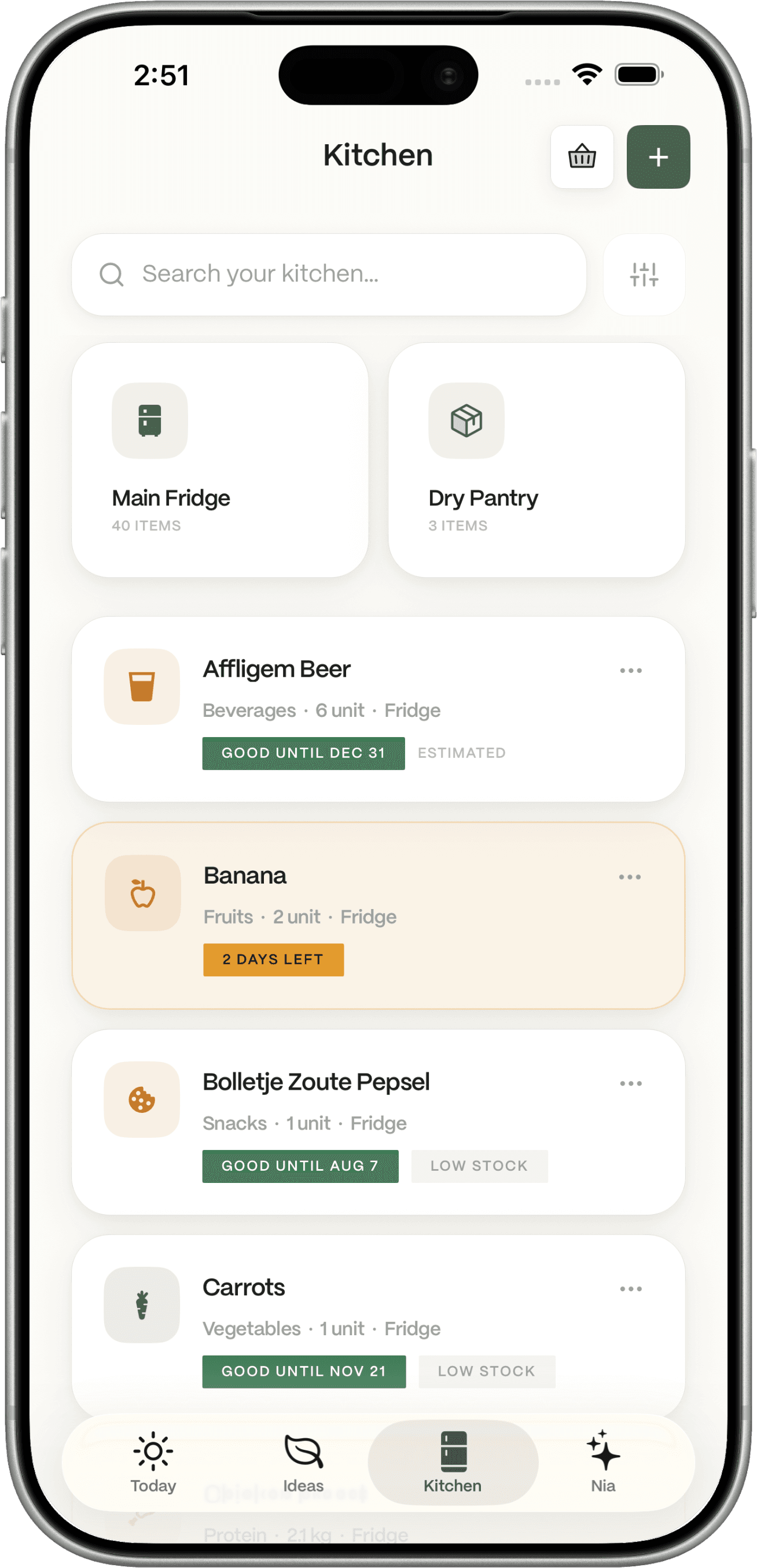
Existing product screenshot. It's an interface illustration, not a measured demonstration of scanner accuracy or inventory freshness.
See the fridge inventory app page, pantry inventory, and ingredient-based meal planner to understand which parts of the cooking workflow each feature handles.
The simplest maintenance routine
After shopping: update new groceries. Before cooking: check use-soon foods. After cooking: mark used-up foods. Once a week: remove stale entries and check the back of the fridge.
This is intentionally small. If you're spending more time logging groceries than cooking dinner, reduce the amount you track.
Frequently asked questions
Is there a free fridge inventory tracker?
A note or spreadsheet is free and works well for small inventories. Dietrack also offers manual kitchen tracking in its free tier; check current pricing for AI scan allowances and premium features.
Can an app scan my fridge and know exactly what I have?
A photograph may help recognise visible foods, but hidden items, weights, duplicates and dates can be missed. Review the proposed entries and correct them.
Do I have to add every condiment?
No. Start with perishables you forget and staples you often rebuy. Expand only if a specific missing detail is making your meal plan worse.
What's the difference between pantry tracking and fridge tracking?
The main distinction is where the food lives and how urgently you need to use it. A single kitchen inventory with locations is often more practical than maintaining multiple unrelated lists.
Ready to try it? Start with five real foods. If you'd like those foods to influence dinner ideas, explore Dietrack's fridge inventory.