Already have groceries but still need a meal plan and a shopping list? Start by checking what is in your fridge and pantry. Choose meals that use those foods, then write down only the ingredients you still need. A planner that ignores your kitchen might give you attractive recipes and an unnecessarily long shopping list.
This guide is for people who want tonight's dinner or today's meals, not a rigid seven-day calendar. If your priority is a weekly schedule with one automatically consolidated shopping order, check whether an app explicitly supports that: not all AI meal planners do.
We build Dietrack. Below is an illustrative cooking example, not a recorded AI output or a claim that Dietrack produced these exact meals. We describe the current Dietrack Ideas and shopping-list workflow separately, including what still needs a human check.
Try this first: five foods, two dinner options
Imagine you check your kitchen and find:
| Food you already have | Check before planning |
|---|---|
| One tin of chickpeas | Is it unopened, and do you have a suitable allergy-safe product? |
| Three tomatoes | Are they still usable? |
| A partly used bag of spinach | Is it fresh and within safe storage dates? |
| Dry rice | How much is left? |
| Four eggs | Dietary preference and use-by guidance |
From that list you can sketch two possible meals:
Option A — Tomato, chickpea and spinach rice bowl. Cook rice, warm chickpeas with chopped tomatoes and spinach, and season with whatever suitable pantry staples you actually own. For a vegan household, check the sauce and any toppings too.
Option B — Egg and spinach fried rice. Use properly cooked and cooled rice handled safely, eggs, spinach and optional tomato. This is not vegan, and may be unsuitable for people avoiding eggs. Follow safe rice storage and reheating guidance; do not assume leftover rice is safe merely because it looks fine.
These are idea patterns, not complete tested recipes. Use known cooking instructions and quantities appropriate for your household. The point is to make the ingredients already available the starting constraint.
Convert the meal into a short shopping list
| If you choose... | Ingredients used at home | Possible missing items — only if wanted |
|---|---|---|
| Chickpea rice bowl | Chickpeas, tomatoes, spinach, rice | Lemon, herbs or a suitable sauce |
| Egg fried rice | Eggs, spinach, rice, optional tomatoes | Spring onions or a suitable seasoning |
Notice that lemon and spring onions are optional extras, not reasons to buy a whole new basket. If you already have them, they do not belong on your list. If you do not want them, the plan can work without them.
The most useful question a meal planner can answer is not simply “What can I cook?” It is “What can I cook with my real ingredients, and what—if anything—would I need to buy?”
For the ingredient-first workflow, see what to cook with what you have. For the grocery side, see the smart grocery list.
A five-step ingredient-first planning workflow
- Take inventory before asking for ideas. Include the fridge, freezer and pantry. Do not assume yesterday's app inventory reflects what you ate today.
- Check food safety. Give priority to appropriate use-soon items, but discard food that is unsafe; a planner should never overrule use-by dates or safe handling.
- Choose the meal that fits your life. Consider time, available equipment, allergies, dislikes and how many people are eating. A calorie estimate is not a cooking instruction or medical guarantee.
- Review missing ingredients. Are they required for the recipe to work, or just nice-to-have extras? Add only genuine gaps.
- Update the kitchen after cooking or shopping. A useful inventory is not a one-time photograph; it needs occasional corrections when food is eaten, thrown out or restocked.
If typing every grocery item sounds exhausting, Dietrack has a receipt photo and confirmation workflow. The confirmation step matters: an abbreviated receipt cannot reliably tell a scanner everything about the food.
How different apps handle the plan-to-list problem
| Approach | Useful for | What you should verify |
|---|---|---|
| General-purpose chatbot | One-off inspiration from an ingredient list you type | You'll need to provide and verify the actual inventory, preferences and missing items |
| Weekly meal planner | Scheduling several days and combining recipe ingredients | Whether pantry ingredients are excluded correctly, and what is included in the free tier |
| Ingredient-based recipe search | Finding established recipes from foods you select | Whether it tracks quantities, freshness and foods you have used |
| Dietrack Ideas + shopping list | Today's meal suggestions informed by your saved kitchen and goals | It is not a full automatic seven-day meal calendar; add and review missing items in the shopping-list flow |
For example, Eat This Much describes daily and weekly planning workflows, and SuperCook focuses on finding recipes from ingredients. Features, costs and grocery-list automation differ; consult each provider's current information before deciding.
This is a capability comparison based on documented workflows, not a blind taste-test, an app ranking, or a claim that one system is best for everyone.
What this looks like in Dietrack
Dietrack can keep the food you add to your kitchen as context for today's Ideas and suggest meals that take preferences and targets into account. It can label supporting ingredients rather than pretending they are already at home.
You can add foods manually, from appropriate barcode matches, or by reviewing a receipt or fridge photo, depending on the feature and plan. The shopping-list feature lets you add missing ingredients and mark purchases. It does not promise to generate a complete, aisle-sorted weekly supermarket order.
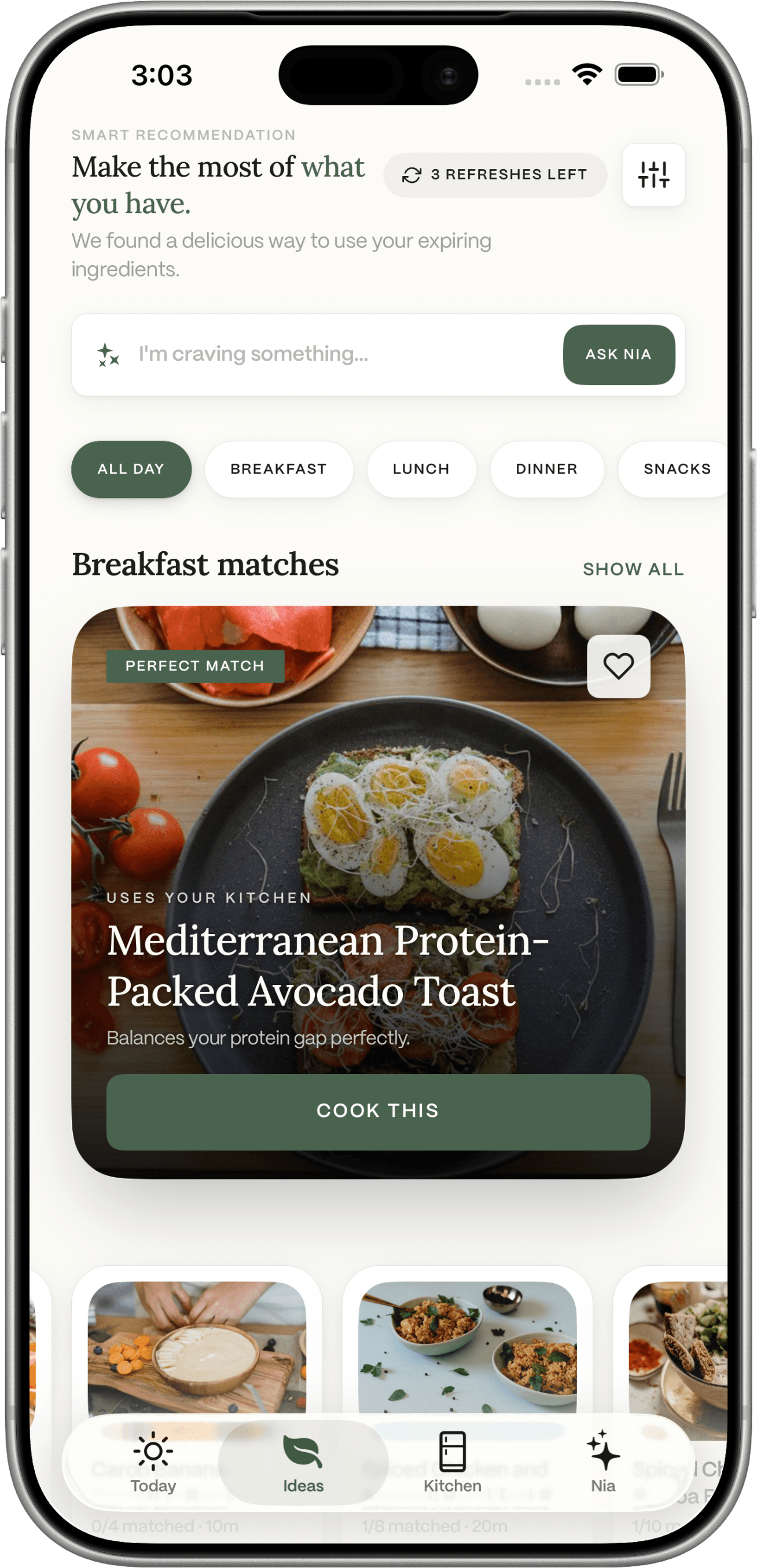
Product screenshot showing the app's Ideas interface; the dinner examples above are illustrative, not generated results from this screenshot.
You can explore how Ideas works, what's included in Dietrack Pro, and the kitchen-to-shopping-list flow before downloading.
Mistakes that make any AI grocery list less useful
- Treating the pantry as infinite. A jar might be almost empty, even if it is listed.
- Trusting every photo or receipt extraction. Check product names, quantities, allergies and non-food items.
- Shopping for every optional garnish. A meal suggestion should not force unnecessary purchases.
- Confusing planned food with cooked food. Update inventory after actual cooking, not merely when selecting a recipe.
- Treating estimated macros as exact. Oil, servings and product brands can change the figures; inspect labels or reliable composition data when precision matters.
Frequently asked questions
Can an AI meal planner make a grocery list from ingredients I already have?
It can help, provided it knows which ingredients are actually available and you check what's missing. Apps differ: some compile weekly shopping lists automatically, while others let you add missing ingredients from individual recipe ideas.
Is Dietrack a weekly meal-planning calendar?
No. Dietrack's Ideas feature focuses on a day of breakfast, lunch, dinner and snack suggestions. If you specifically need an automatic seven-day grid and a complete weekly supermarket order, look for a tool designed for that workflow.
Do I need to scan my entire fridge first?
No. A short manually entered list is sufficient to try an ingredient-first approach. Photos and receipts can reduce typing, but require review and are subject to plan limits.
Will this prevent food waste?
No app can promise that. Keeping a realistic inventory, checking safety and using appropriate perishables first may help you make better use of groceries, but the outcome depends on how you shop, cook and update the list.
Try it with your own five ingredients: see today's Dietrack meal planner, then see how missing items enter the shopping list.